Common Error Messages
This page explains the messages you might see while using IndustryComplete, and what to do about them.
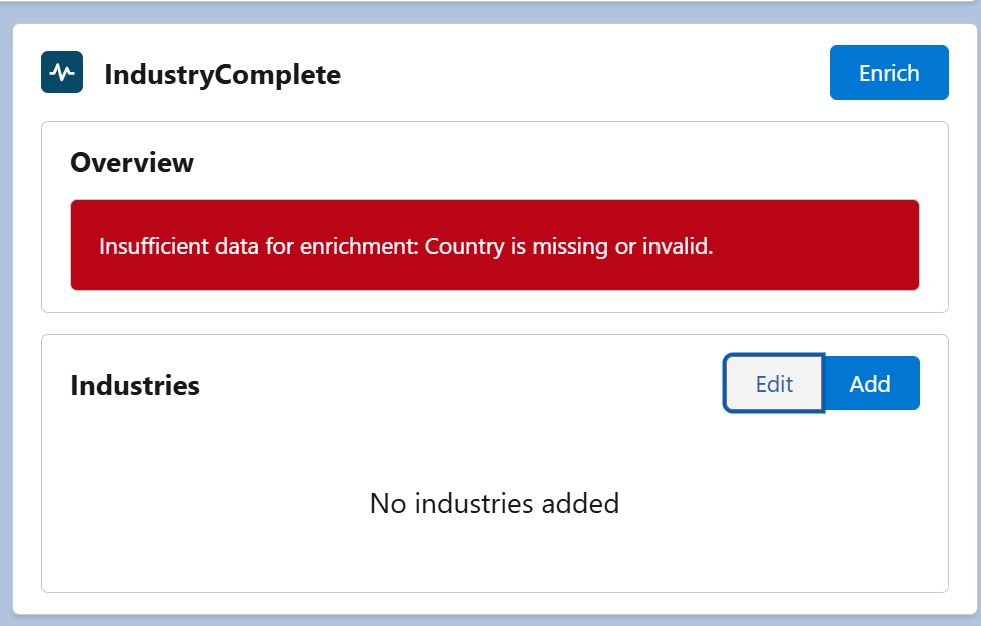
When Clicking Enrich
| Message | What It Means | What To Do |
|---|---|---|
| You are not assigned the IndustryComplete Standard User permission set. Please contact your Salesforce administrator. | Your user doesn't have the Permission Set needed to use IndustryComplete. | Ask your admin to assign the IndustryComplete Standard User Permission Set – see Permission Set Assignments. |
| Only Lead and Account records can be enriched. | Enrichment was attempted on an unsupported object. | Enrichment is only available on Lead and Account records. |
| Unable to create enrichment request. Please try again. | A temporary problem occurred while starting the request. | Wait a moment and click Enrich again. If it keeps happening, contact your administrator. |
Enrichment Result Statuses
After clicking Enrich, the record reaches one of these outcomes:
| Status | Meaning |
|---|---|
| Succeeded | Enrichment completed and the overview and industry suggestions were applied to the record. |
| On Hold | Enrichment is on hold because your organisation may not have enough credits or an active credit allocation. Contact your administrator to review your IndustryComplete credit balance. |
| Not Found | The AI completed its research but couldn't find enough reliable information about the company to enrich the record. Double-check the company name and website are correct. |
| Unable | The request couldn't be started. This can happen if an enrichment request for this record is already running, or no active industry standard has been selected. Wait for any in-progress request to finish, or contact your administrator. |
| Failed | A non-recoverable error stopped enrichment. A specific reason is shown, for example: |
Common Failed Reasons
| Reason Shown | What It Means | What To Do |
|---|---|---|
| Insufficient data for enrichment: … | A required detail was missing or invalid (for example the Country, company name, or Website), so enrichment couldn't start. | Add or correct the missing detail, or configure an organisation or user country fallback, then click Enrich again. |
| Insufficient data for enrichment: country is missing. | No country was available on the record, for the Salesforce organisation, or for the Salesforce user. | Add the company's Country, configure a Salesforce organisation country, or configure your Salesforce user country, then click Enrich again. |
| Insufficient data for enrichment: website is missing. | The Website field was blank. For a Lead, Email was also blank, invalid, or used a generic provider. Accounts cannot use an email address as a fallback. | For an Account, add the company's Website. For a Lead, add the company's Website or a valid business Email, then click Enrich again. |
| Site blocked automated access | The company's website blocked IndustryComplete's automated request (for example, a bot-protection service). | Enrichment can't retrieve this site automatically. Consider adding industry codes manually – see Add Industries to Your Records. |
| Site unavailable | The company's website couldn't be reached. | Confirm the Website field is correct and the site is online, then try again. |
| Insufficient information found online | The website didn't contain enough usable content to classify the company. | Add industry codes manually instead. |
| An error occurred during enrichment processing. | A generic fallback shown when no specific reason is available. | Try again. If it persists, contact your administrator with the record ID and approximate time. |
If enrichment is left in a processing state (for example, Researching) for an unusually long time without moving to a final status, try refreshing the page. If it still hasn't completed, contact your administrator.
Industries List
| Message | What It Means | What To Do |
|---|---|---|
| No industry codes are installed. Please contact your Salesforce administrator. | No industry standard has been installed in your org yet. | Ask your admin to complete Install Industry Classification Codes. |
| No industries added | The record currently has no industry codes assigned. | Use Add to search for and assign an industry code – see Add Industries to Your Records. |
Still Need Help?
If a message isn't listed here, or the suggested fix doesn't resolve it, contact ProvenWorks support:
- Email: support@provenworks.com
- Website: provenworks.com
- Service Status: status.provenworks.com
Include your Org ID (visible on the IndustryComplete Administration Settings tab), the record affected, and roughly when the issue occurred.